Article Number: 4 of 100
Topic: Keyword Research
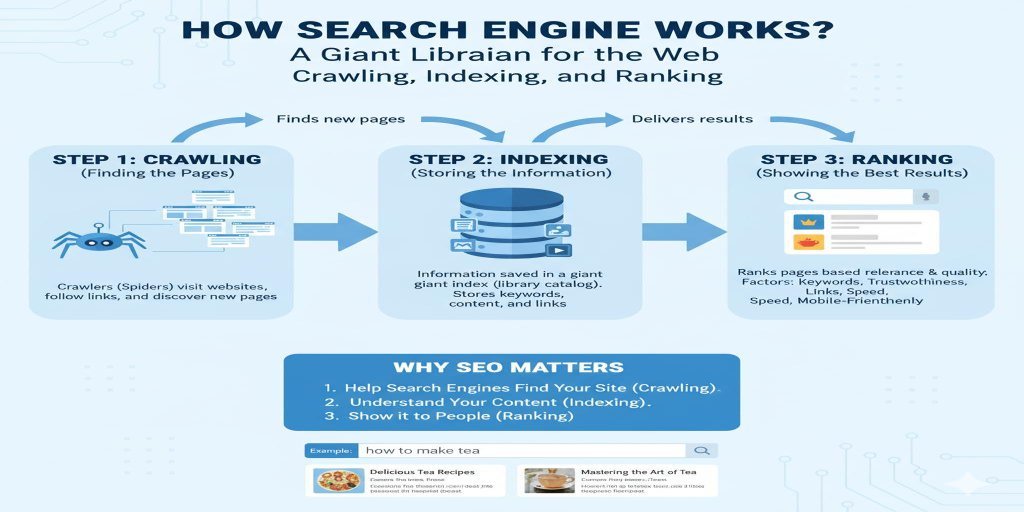
If you want your website to attract visitors from Google, understanding what people search for is an important first step. You may publish excellent articles, tutorials, or online tools, but without understanding your audience’s search behavior, your pages might struggle to reach the right people.
This is where keyword research becomes essential.
Keyword research helps website owners discover the words and phrases people enter into search engines. It allows you to plan relevant content, understand search intent, and identify opportunities to improve organic traffic.
In this guide, you will learn what keyword research is, why it matters, how to find keywords, and how to choose the right keywords for your apps and website.
What Is Keyword Research?
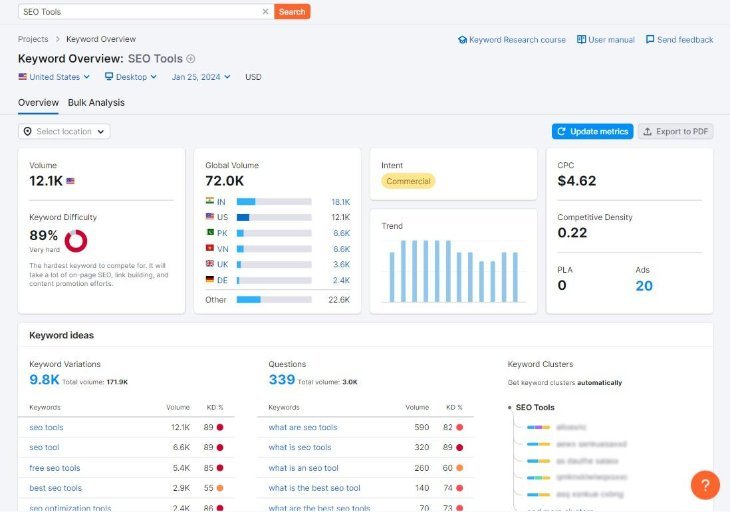
Keyword research is the process of discovering and analyzing search terms that people use when looking for information, products, services, or solutions online.
These search terms are called keywords or keyphrases.
For example, someone searching for an image compression tool might use phrases such as:
- Free image compressor
- Compress JPG online
- Reduce image size without losing quality
- Best image compression tool
- How to compress images for websites
Each phrase represents a potential keyword opportunity.
Website owners use keyword research to understand what their target audience wants and create pages that address those needs.
Why Is Keyword Research Important for SEO?

Keyword research helps you make better decisions about your website content.
1. Understand Your Audience
Keyword research reveals the questions and problems people search for online.
This information helps you create content that matches their interests.
2. Discover Content Opportunities
You can find topics that are relevant to your website but are not yet covered by your existing articles.
3. Improve Search Visibility
Targeting relevant keywords helps search engines understand what your pages discuss.
4. Attract Relevant Visitors
A well-targeted page can attract visitors who are genuinely interested in its subject.
5. Plan Your Content Strategy
Instead of publishing random articles, you can build an organized content plan around related topics.
Different Types of Keywords
Understanding keyword types helps you choose suitable phrases for your content strategy.
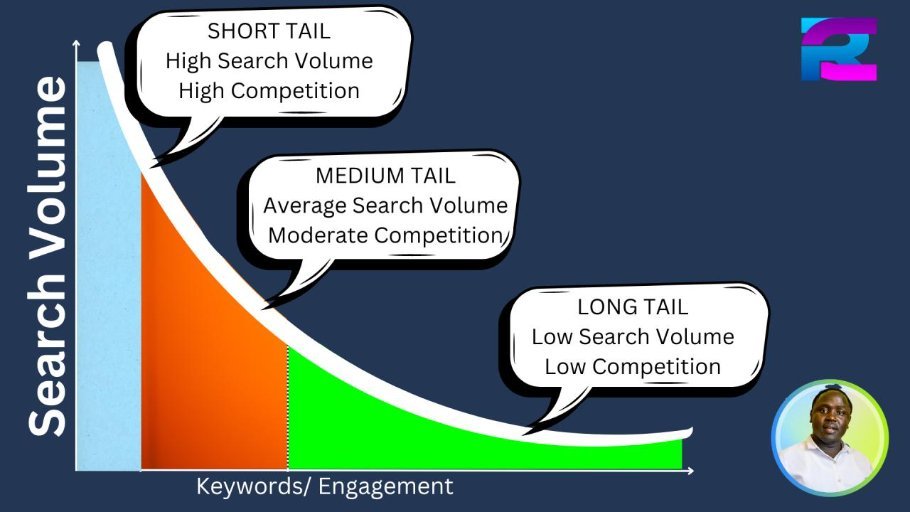
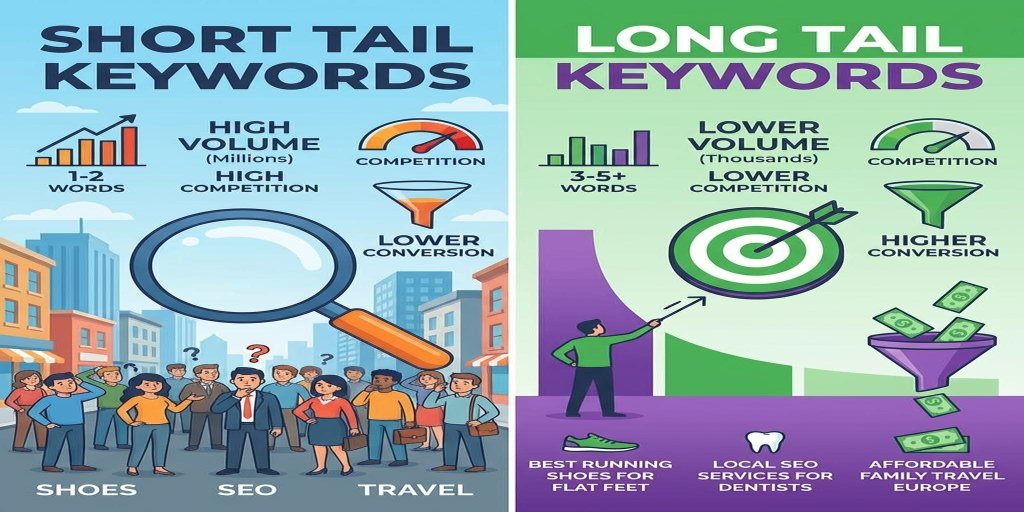
1. Short-Tail Keywords
Short-tail keywords are usually broad search phrases containing one or two words.
Examples:
- SEO
- Recipes
- WordPress
- Image Tools
- Marketing
These keywords can have substantial search demand, but they are often highly competitive and may have unclear search intent.
2. Long-Tail Keywords
Long-tail keywords are more specific search phrases.
Examples:
- How to improve WordPress SEO for beginners
- Best free image compressor for JPG files
- Easy chicken biryani recipe at home
- How to increase organic traffic to a new website
Long-tail keywords can help you target more specific user needs. They may have lower search volume, but they often provide clearer content opportunities.
3. Informational Keywords
These keywords are used when people want to learn something.
Examples:
- What is SEO?
- How does keyword research work?
- How to compress an image
- Benefits of healthy breakfast
Informational keywords are useful for blog posts, educational articles, and tutorials.
4. Commercial Investigation Keywords
People use these searches when comparing products or services before making a decision.
Examples:
- Best SEO plugins for WordPress
- Image compressor comparison
- Best website hosting services
5. Transactional Keywords
These keywords indicate that someone may be ready to take an action, such as buying, downloading, or signing up.
Examples:
- Buy website hosting
- Download PDF editor
- Subscribe to SEO software
How to Find Keywords for Your Website

Follow these steps to discover relevant keywords for your website.
Step 1: Understand Your Website Topic
Start by identifying the main subjects your website covers.
For example:
- A recipe website can focus on cooking, ingredients, and food preparation.
- A technology blog can cover apps, software, and online services.
- An online tools website can target image, PDF, calculator, and SEO tools.
Your keywords should be closely related to your website’s purpose.
Step 2: Create Seed Keywords
Seed keywords are basic phrases that describe your main topics.
For an SEO website, examples include:
- SEO basics
- Keyword research
- Technical SEO
- WordPress SEO
- Backlinks
- Organic traffic
These initial phrases can help you discover more specific search terms.
Step 3: Use Google Autocomplete

Open Google and start typing a relevant phrase.
Google may display autocomplete suggestions based on various factors, including common searches and your context.
For example, typing “how to improve SEO” may suggest related search phrases.
Write down useful suggestions and investigate whether they match your website’s audience.
Step 4: Explore Related Searches and Questions
Search for your topic and review related search suggestions and question-based results.
You may discover additional topics such as:
- What is keyword difficulty?
- How many keywords should an article target?
- How do I find low-competition keywords?
- Are long-tail keywords useful?
These questions can become future article ideas or sections within a comprehensive guide.
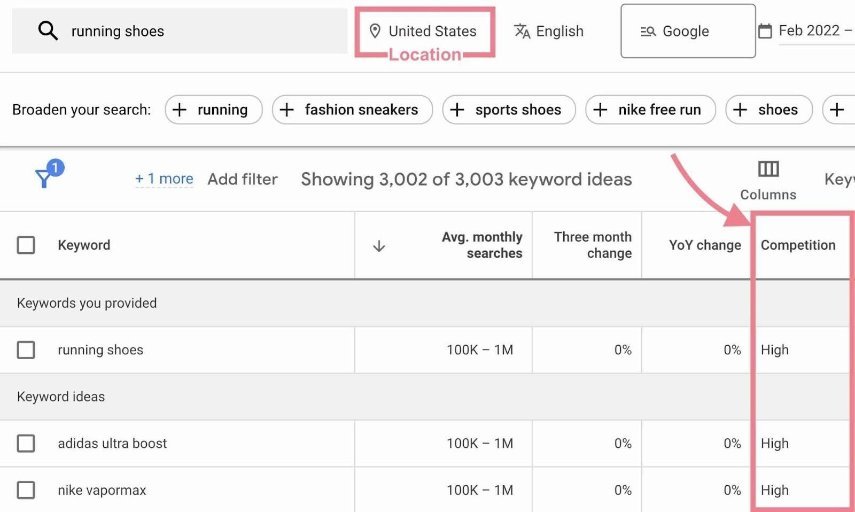
Step 5: Use Free Keyword Research Tools
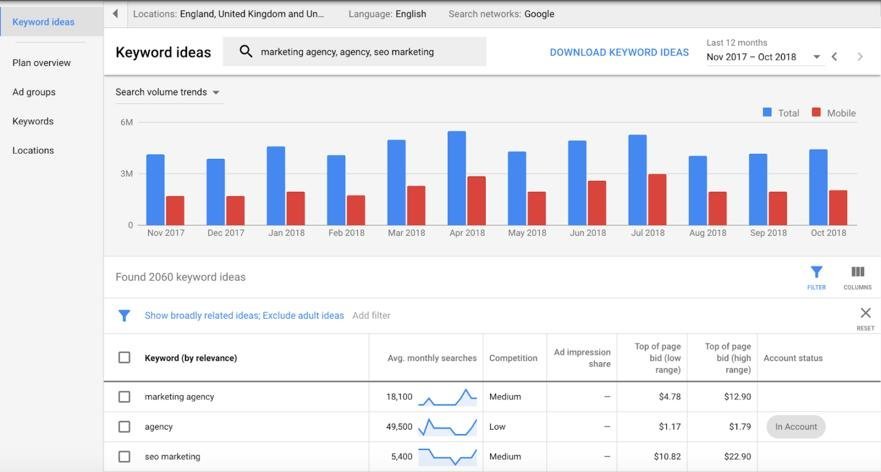
Several free tools can help you explore keyword ideas.
| Tool | Main Purpose |
|---|---|
| Google Keyword Planner | Discover keyword ideas and search estimates |
| Google Trends | Compare search interest over time |
| Google Search Console | Find queries already bringing impressions and clicks |
| Google Autocomplete | Discover search suggestions |
| Bing Webmaster Tools | Review Bing search performance |
| Ahrefs Free Keyword Generator | Explore keyword ideas |
| AnswerThePublic | Discover questions and related search topics |
Some tools have free usage limits or require registration.
Step 6: Analyze Keyword Competition
Not every keyword is equally difficult to target.
Before choosing a keyword, examine the pages currently ranking for it.
Consider:
- Are the top results from established websites?
- Do they answer the search query well?
- Are the results mostly tutorials, product pages, or tools?
- Can you provide more useful information?
- Does your website have relevant expertise and content?
Third-party keyword difficulty scores are estimates, not official Google ranking measurements.
Step 7: Choose the Best Keywords
Select keywords that match your website’s topic, audience, and content capabilities.
A useful keyword selection process considers:
- Relevance to your website.
- Search intent.
- Potential search demand.
- Competition.
- Your ability to provide a better or more useful answer.
Do not select a keyword simply because a tool reports a high search volume.
Understanding Search Intent
Search intent means the reason behind a person’s search.
Understanding it helps you create the correct type of page.
| Search Intent | Example Keyword | Suitable Content |
|---|---|---|
| Informational | What is SEO? | Educational article |
| Navigational | Google Search Console login | Official website |
| Commercial | Best SEO plugins | Comparison article |
| Transactional | Buy SEO software | Product or pricing page |
For example, someone searching “what is keyword research” probably wants an explanation rather than a sales page.
Your content should match what the searcher expects to find.
How to Organize Keywords for Better SEO
After collecting keywords, organize them into topic groups.
For example, a keyword group about image compression might contain:
- Image compression
- Compress JPG online
- Reduce PNG file size
- Image compression without losing quality
- Best image compression settings
You can use these related phrases naturally within one comprehensive page when they share the same search intent.
Create separate pages when the search intent or user need is meaningfully different.
This approach helps prevent unnecessary keyword cannibalization, where multiple pages compete for similar searches without offering distinct value.
Common Keyword Research Mistakes to Avoid
Avoid these mistakes when planning your SEO strategy:
- Choosing keywords unrelated to your website.
- Focusing only on search volume.
- Ignoring search intent.
- Targeting extremely competitive keywords without a realistic strategy.
- Repeating the same keyword unnaturally.
- Creating several nearly identical pages.
- Ignoring long-tail keyword opportunities.
- Using outdated keyword data without checking current results.
- Forgetting to analyze your existing Search Console queries.
- Publishing content that does not answer the target search.
Conclusion
Keyword research is one of the foundations of a successful SEO strategy. It helps you understand your audience, discover useful content ideas, identify search opportunities, and create pages that match real search needs.
Start by understanding your website topic, collecting seed keywords, exploring search suggestions, and analyzing competition. Then organize your findings into relevant content groups.
Remember that effective keyword research is not about adding as many keywords as possible. It is about understanding what people need and creating genuinely useful content that satisfies their searches.
Next article: Article 5 – What Are Keywords in SEO? Types, Examples, and How to Use Them.
We’ll continue sequentially toward Article 100, one complete article per installment.
Frequently Asked Questions
Keyword research is the process of finding and analyzing search phrases people use to discover information, products, and services online.
They can be useful because they often describe specific user needs and may have less competition than broad phrases. However, suitability depends on the topic and search results.
Google Keyword Planner, Google Trends, Google Search Console, and Google Autocomplete are useful starting points.
Time needed: 5 minutes
Learn what keyword research is, discover keyword types, and find relevant search terms to improve your SEO strategy and organic traffic.
- 4. How many keywords should I target in one article?
Focus on one main topic and its relevant related phrases. There is no fixed ideal keyword count.